
Nauti-Control v2.0.3 Firmware Update – Wi-Fi Slave Mode and Static IP Support
The Nauti-Control v2.0.3 firmware update adds support for connecting your device to an existing Wi-Fi network as a slave (station) mode. This feature allows the Nauti-Control box to join another network using either static IP settings or dynamic IP (DHCP), offering greater flexibility when integrating with onboard networks or routers.
How to Set Up Wi-Fi Slave Mode
To configure Wi-Fi slave mode:
- Connect to the built-in Nauti-Control Wi-Fi access point (AP) as usual.
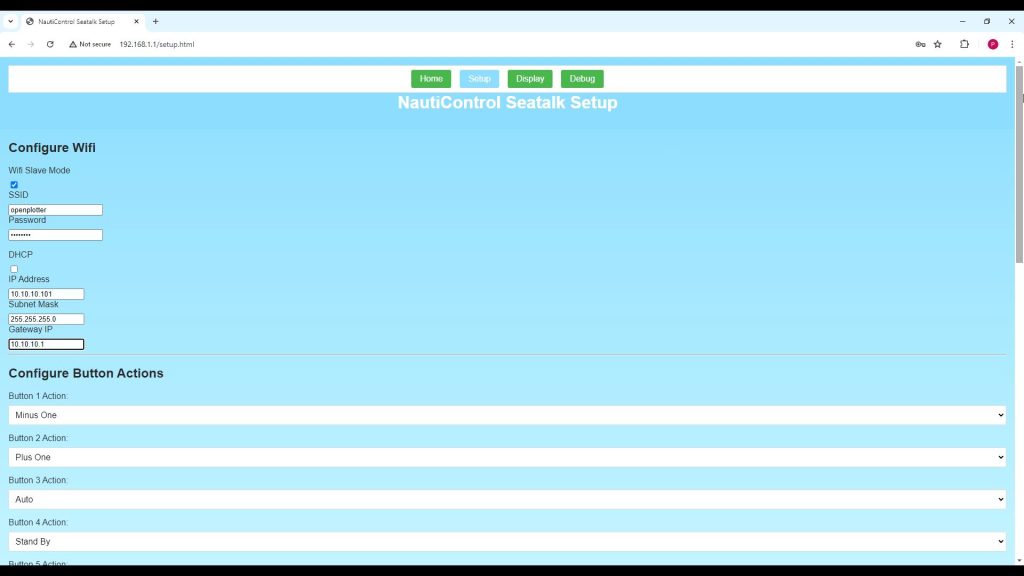
- Open the Setup Page and go to the Settings section.
- Configure the following fields:
- Wi-Fi Slave Mode: Tick this option to enable.
- SSID: Enter the name of the Wi-Fi network you want to connect to.
- Password: Enter the network password.
- IP Address: Set a static IP address (e.g.
10.10.10.101). - Subnet: Enter your subnet (e.g.
255.255.255.0). - Gateway: Enter your router’s IP (e.g.
10.10.10.1). - DHCP: Tick this if you prefer a dynamic IP instead of static.
If you use DHCP, you may need to check your router for the assigned IP or use the device hostname nauti-control to connect.
This update makes it easier to integrate Nauti-Control ST Wireless into existing onboard networks and control systems, improving connectivity for configuration and data exchange.



Leave a Reply
You must be logged in to post a comment.