Nauti-Control 3.0 — What’s New
Nauti-Control 3.0 is a major update across the Nauti-Control controller and the full companion app ecosystem, including Android, iPhone and iPad, Garmin, Wear OS, and Apple Watch.
Compared to the previous 2.x generation, version 3.0 focuses on broader boat network support, stronger security, safer autopilot control, guided first-time setup, and a more polished experience on every screen size.
Controller firmware 3.0
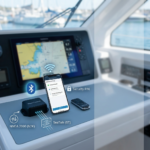
The controller has evolved from a SeaTalk wireless remote system into a full marine data bridge, connecting your boat’s instruments and autopilot to your phone, watch, tablet, and web browser over WiFi and Bluetooth.
SeaTalk and NMEA 2000 support
Connect the controller to an NMEA 2000 network and view wind, speed, depth, heading, autopilot status, AIS targets, waypoint information, and more on your apps and web display.
Classic SeaTalk autopilots and instruments are still fully supported.
Expanded autopilot compatibility
Version 3.0 adds and refines support for more autopilot types on NMEA 2000 networks.
- B&G / Simrad — remote control for compatible autopilots
- Simrad TP22 / TP32 — dedicated remote control support
- Raymarine / SeaTalk — continued support for classic Raymarine autopilots
You choose your autopilot type in the web Setup page, and your phone and watch apps stay in sync.
Security and first-time setup
- Guided setup wizard — set your admin password, WiFi password, and Bluetooth PIN in one simple flow the first time you power on.
- Protected web pages — Setup, Display, Debug, and Update pages require a login.
- Bluetooth PIN — your phone and watch must enter the PIN before they can see live boat data.
- Lockout after failed attempts — repeated wrong PINs temporarily block access for added security.
Autopilot lock
Lock autopilot commands from the web browser, phone apps, watches, or handheld remotes.
When locked, heading and mode changes are blocked everywhere. This is a key safety feature when crew are moving around the boat or when you want to prevent accidental autopilot commands.
Connectivity improvements
- Easy controller access — find your controller on the boat network by name, for example
http://YOUR-BOAT-NAME.local. - Better WiFi — improved client mode, static IP options, and reliable fallback if the connection drops.
- Live web display — gauge and instrument pages update in real time.
- NMEA over WiFi — stream navigation data to OpenCPN and other chartplotter apps on your network.
- Multiple devices at once — phone, watch, and tablet can all connect simultaneously.
- Longer Bluetooth range — stronger transmit power for better coverage on deck.
Remotes and RF
- Handheld remotes ready out of the box — no extra reboot after setup.
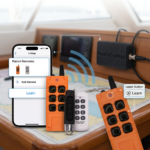
- Learn new remote buttons from the Setup page without restarting the controller.
- Multiple remotes — name each remote and assign buttons independently.
- Manage remotes from your phone — learn codes and map actions from the Android or iOS app.
Navigation and safety
- Man Overboard, MOB — trigger and cancel MOB alerts from your apps.
- AIS targets — see nearby vessels on NMEA 2000 builds.
- Waypoint and destination info — route details surfaced in apps and the web UI.
- Optional traffic logging — helpful for troubleshooting on the water.
Web UI and maintenance
- Refreshed look across Home, Setup, Display, Debug, and Update pages.
- Over-the-air firmware updates from the web Update page.
Android app 3.0
Setup and security
- In-app setup wizard — if your controller has not been configured yet, the app walks you through Bluetooth PIN, admin password, and WiFi password, then sends everything to the device.
- Bluetooth PIN saved securely on your phone and remembered per controller.
- Safety disclaimer on first launch before autopilot controls are available.
- Upgrade notice when connecting to older controllers that do not support the new security features.
Sailing features
- Live map with nautical charts and a configurable three-metric overlay, including speed, wind, depth, and more.
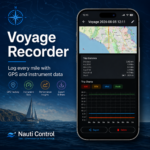
- Voyage recording with session history, statistics, and GPX / NMEA export.
- Man Overboard trigger and cancel from the map screen.
- Configurable dashboard — add, remove, and reorder wind rose, compass, charts, and plot widgets.
- Autopilot screen with heading adjust, tack, and mode controls.
- Autopilot lock synced with the controller.
- Demo mode — try the full UI without hardware.
Device management
- Device settings — change WiFi, Bluetooth name, service toggles, autopilot type, and more from the app.
- Manage remotes — learn RF codes and assign button actions.
- Network name — set how your controller appears on the boat network.
- Change web admin password from your phone.
Languages
The Android app includes a full English UI, plus German, French, Spanish, Italian, Dutch, and Swedish.
iOS app 3.0
The iPhone and iPad app now has feature parity with Android, including:
- Setup wizard for controllers that need first-time configuration
- Secure Bluetooth PIN storage
- Autopilot lock with clear lock and unlock controls
- Map and voyage recording with GPX and NMEA export
- Configurable map overlays and night / red theme
- Device settings and remote management
- Web security settings for the controller admin password
- Safety warning and legacy controller notice
- Demo mode for trying the app without a controller
- Six additional languages: German, French, Spanish, Italian, Dutch, and Swedish
Bluetooth connection handling has also been improved, with faster authentication, setup detection, and more reliable reconnection.
Garmin Connect IQ 3.0
- More compatible watches — broader Fenix, Forerunner, and related device support.
- Multilingual UI — German, French, Italian, Dutch, Spanish, and Swedish.
- Bluetooth PIN and handling for older controller firmware.
- Safety warning before connection.
- Voyage recording — sync sailing activities to Garmin Connect.
- Glance view — speed and heading snippet on supported watch faces.
- Configurable hardware buttons for autopilot commands.
- MOB overlay with confirmation flow.
- Watch GPS speed — optionally use the watch GPS for speed over ground.
- Reorderable data pages — Speed / Heading, Wind, Autopilot, and Voyage.
Wear OS 3.x
Built for round and square Wear OS watches:
- Pick your controller when several are in range.
- Autopilot lock bar on autopilot screens, with lock state synced from the controller.
- Bluetooth PIN with retry and legacy-controller notice.
- Safety warning on each launch.
- Swipeable pages — Speed / Heading, Wind, Autopilot Status, Autopilot Control, Voyage, and Settings.
- Reorder pages to match how you sail.
- Tap to switch between speed / heading and speed-through-water / heading on instrument screens.
- Haptic feedback on interactions.
- Demo mode with simulated data.
- Localised UI across the app.
Apple Watch 3.0
A ground-up update from the original Apple Watch app:
- Nauti complication — speed, heading, and wind on your watch face.
- Multi-controller selection when more than one controller is nearby.
- Autopilot lock with a clear lock bar and disabled controls while locked.
- Reorderable pages with vertical tab navigation.
- Screen settings and improved voyage tracking.
- Safety warning and Bluetooth PIN flow with clear “Securing connection…” feedback.
- Demo mode for trying the app without a controller.
- Haptics on interactive controls.
- Full localisation including complication text in German, French, Spanish, Italian, Dutch, and Swedish.
Across all apps
These improvements work together with controller firmware 3.0:
- Secure Bluetooth — PIN required on newly set up controllers before live data is shared.
- Efficient data delivery — faster, lower-battery updates on phone and watch.
- Autopilot lock — consistent lock behaviour on controller, web, phone, and watch.
- Setup detection — apps know when your controller still needs first-time configuration.
- Older controller support — previous-generation controllers still connect, with upgrade recommendations where possible.
- Demo mode — try instruments and autopilot controls without leaving the dock.
Getting started
Controller firmware
- Choose the firmware that matches your boat: SeaTalk or NMEA 2000.
- After updating from 2.x, complete the first-time setup wizard on the controller’s web page or from the mobile app.
- Set your admin password, WiFi password, and Bluetooth PIN.
Apps
- Update all companion apps to 3.0 or later for the best experience, especially for autopilot lock, guided setup, and secure Bluetooth.
- Apple Watch users can add the Nauti complication after updating.
- Garmin users can update through the Connect IQ store.
Recommended versions
| Controller firmware | Recommended app versions |
|---|---|
| 3.0.0 | Android 3.0+, iOS 3.0, Garmin 3.0.0, Wear OS 3.1+, Apple Watch 3.0.0 |
Firmware flashing downloads
Firmware downloads for use with the Windows flashing app:
- NMEA 2000 firmware: Download N2K firmware
- SeaTalk firmware: Download SeaTalk firmware
You can also use the web flasher in Chrome on Windows, Mac, or Linux.
Click Flash Firmware, then select the COM port for your device. It should usually appear as CP2102, CH910x, or CH340.
If the device does not appear, you may need to install the correct USB driver and check Windows Device Manager which should state the type .
- CP2102 Windows driver: Download driver
Summary
Nauti-Control 3.0 transforms the controller into a secure marine gateway and brings every companion app up to date with guided setup, PIN-protected Bluetooth, autopilot safety lock, NMEA 2000 support, richer voyage tools, and a consistent experience from phone to wrist.
Whether you sail with classic SeaTalk equipment or a modern NMEA 2000 network, version 3.0 is designed to be the single wireless bridge between your boat and every screen on board.
Quick start guide available here
https://nauti-control.com/quick-start-guide/
Leave a Reply
You must be logged in to post a comment.