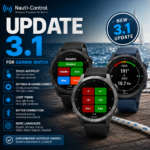
Nauti-Control 3.1 is the first major update to the Garmin Connect IQ app.
If you installed the original Garmin Store version, this is the update to get.
The core idea remains the same: live boat instruments and supplementary autopilot control directly from your Garmin watch, communicating straight with the Nauti-Control box over Bluetooth. No phone is required on deck.
Version 3.1 makes the watch app easier to use, improves Bluetooth connection handling, adds a new touch-first autopilot interface, moves settings into Garmin Connect, introduces display themes and adds a number of smaller usability improvements.
Safety: Nauti-Control provides supplementary autopilot control only. Always maintain a proper lookout and confirm autopilot mode on the helm. The Garmin app is not intended to be used as a primary navigation instrument.
New touch autopilot controls
One of the biggest changes in 3.1 is a completely revised autopilot interface for touch-enabled Garmin watches.
On watches such as the fēnix 7, Epix, Venu, quatix and other supported touchscreen models, autopilot control is now designed around simple on-screen buttons.
Autopilot Mode
Quickly select:
- Standby
- Auto
- Wind
- Track
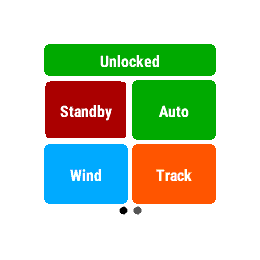
The controls are deliberately large so they remain easy to use on both small and large round watch displays.
Autopilot Control
The dedicated control page provides:
- −1°
- +1°
- −10°
- +10°
- Port Tack
- Starboard Tack
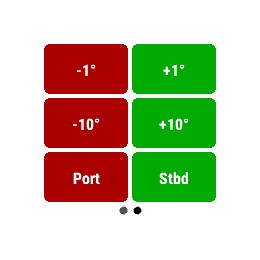
Simply tap the command you want.
Tack commands include an additional confirmation step before anything is sent to the autopilot. Haptic feedback is generated when the command is actually transmitted.
You can also hide the tack controls entirely in Garmin Connect settings.
Button watches are still supported
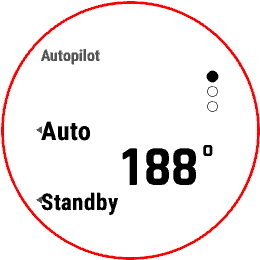
Button-only watches such as the fēnix 6 Pro continue to use the original three-page autopilot interface.
By default:
| Page | UP | DOWN |
|---|---|---|
| 1 | Auto | Standby |
| 2 | +1° | −1° |
| 3 | +10° | −10° |
Pressing SELECT cycles through the control pages.
The individual UP and DOWN commands can now be customised through Garmin Connect.
If you have a touchscreen watch but prefer physical controls, you can switch back to this interface using:
AP Interface → Watch buttons
Settings have moved to Garmin Connect
App settings are no longer buried in a menu on the watch.
They are now managed through the Garmin Connect app on your phone.
Open:
Garmin Connect → your watch → Connect IQ → Nauti-Control → Settings
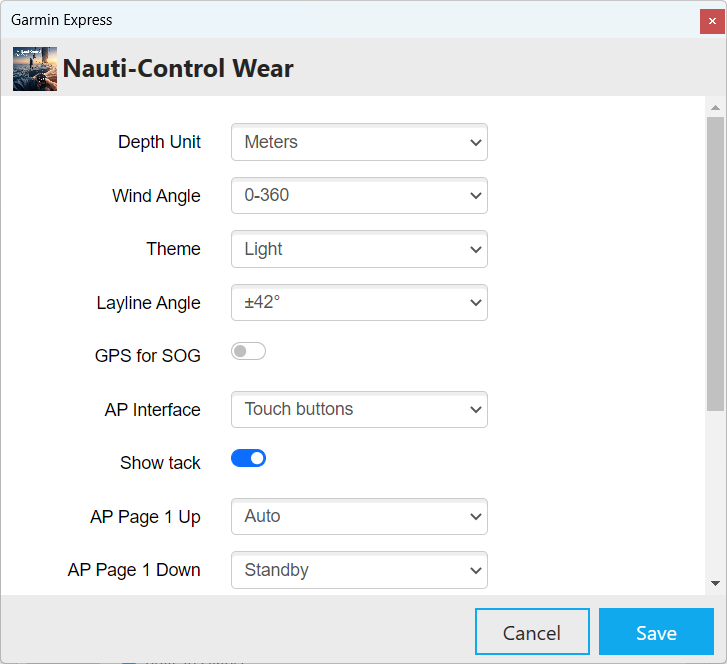
From here you can configure:
- Depth Unit — metres or feet
- Wind Angle — 0–360° or port / starboard
- Theme
- Layline Angle
- GPS for SOG
- AP Interface
- Show Tack
- AP Page 1–3 UP / DOWN commands
After changing a setting, allow Garmin Connect to sync with the watch. The Nauti-Control app will then pick up the new configuration.
GPS for SOG
There is now an optional GPS for SOG setting.
Normally, Nauti-Control displays Speed Over Ground received from the boat network through the Nauti-Control box.
If GPS for SOG is enabled, the Garmin watch instead uses its own GNSS receiver.
For most users, this should be left off.
Turn it on only if you deliberately want SOG from the watch rather than from your boat instruments.
If enabled indoors or before the watch has acquired a GPS fix, SOG may temporarily show -- or 0.
New Light theme
Version 3.1 introduces a new Light theme.
This is particularly useful on Garmin watches with MIP displays, such as many fēnix models, where a light background can improve visibility in bright sunlight.
Available themes are:
- Light
- High Contrast
- Dark
AMOLED watches such as Epix and Venu default to High Contrast, while Light is especially useful on transflective MIP displays.
The selected theme is also used by warning screens and menus so the interface remains consistent.
Larger wind display
The wind instrument has also been updated.
The compass display is now larger and easier to read at a glance, particularly on round watch faces.
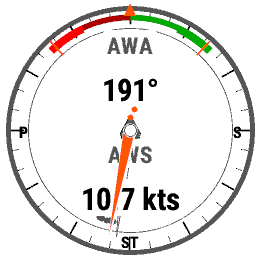
Wind angle can be displayed as either:
- 0–360°
- Port / Starboard
The layline angle displayed around the wind compass can also be adjusted from Garmin Connect settings.
Improved Bluetooth connection and pairing
Bluetooth connection handling has been tightened up considerably compared with the original release.
Version 3.1 includes:
- More reliable scanning
- Improved reconnect behaviour
- Clearer device not found — retry handling
- Better multiple-device selection
- Touch and button navigation on the Select Device screen
If more than one Nauti-Control box is nearby, you can select which one to use.
On touch watches, simply tap the required device.
On button watches:
- UP / DOWN — highlight device
- SELECT — connect
PIN entry remains:
- UP / DOWN — change digit
- SELECT — next digit
- MENU — submit
The watch remembers the Nauti-Control box for future launches.
Up to four Bluetooth clients can be connected to one Nauti-Control box at the same time, for example a Garmin watch, phone, tablet and another device.
Tack confirmation
Tack commands are deliberately treated differently from simple course adjustments.
If tack controls are enabled, selecting Port or Starboard requires confirmation before the command is sent.
Haptic feedback only occurs once the command is transmitted.
If you don’t want tack controls available from the watch, simply disable Show Tack in Garmin Connect.
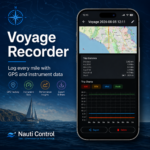
Voyage recording
The Voyage page remains available in 3.1.
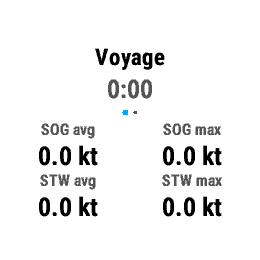
Starting Voyage launches a native Garmin Sailing activity, or a Generic activity on some older Garmin models.
Recorded information can include:
- Time
- Distance
- Average SOG
- Maximum SOG
- STW
- Wind information
- Depth range
The completed activity synchronises with Garmin Connect.
The recorded track uses the Garmin watch’s own GPS, so allow the watch to obtain a GPS fix if you want the route recorded correctly.
More languages
Nauti-Control 3.1 now includes interface support for:
- English
- German
- French
- Italian
- Dutch
- Spanish
- Swedish
The watch automatically uses the appropriate supported language based on the Garmin device language.
Supported Garmin watches
Nauti-Control 3.1 is built for watches listed as compatible in the Garmin Connect IQ Store.
Supported families include:
- fēnix 5 Plus
- fēnix 6 Pro
- fēnix 7 / 7 Pro
- fēnix 8
- Epix 2 / Epix 2 Pro
- Venu 2 / 2 Plus / 3 / 4
- Forerunner 255 / 265 / 955 / 965 / 970
- Vivoactive 5 / 6
- Enduro 3
- MARQ Gen 2
- D2 Mach 1 / 2
Related quatix and other compatible models may also be supported where shown in the Connect IQ Store.
Unsupported models
The following are not included in this build:
- fēnix 6
- fēnix 6S
- Original Enduro
These models do not provide enough application memory for an app of this size.
The easiest way to confirm compatibility is to check the Garmin Connect IQ listing. If your watch is listed there, it is supported.
What autopilots does it work with?
The Garmin watch does not communicate directly with an autopilot.
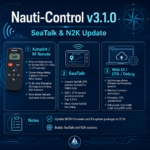
It connects over Bluetooth to a Nauti-Control ST Wireless or N2K Wireless box, which then communicates with the boat system.
Nauti-Control ST Wireless
For compatible classic:
- Raymarine
- Autohelm
- SeaTalk 1 autopilots
Nauti-Control N2K Wireless
For compatible:
- Raymarine Evolution
- Simrad
- B&G
- Other supported NMEA 2000 / SeaTalk NG systems
Nauti-Control is not an official Raymarine, Simrad or B&G product.
How to update to Nauti-Control 3.1
- Open Garmin Connect on your phone.
- Select your Garmin watch.
- Go to Connect IQ → Nauti-Control.
- Install the available update.
- Wait for Garmin Connect to finish syncing with the watch.
- Open Nauti-Control from the watch app list.
If you have not installed the app yet, search for Nauti-Control in the Garmin Connect IQ Store and install it normally.
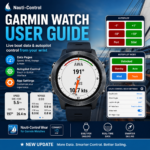
Garmin Watch User Guide
For installation, pairing, settings, instrument pages and troubleshooting, see the full:
Nauti-Control Garmin Watch User Guide
Update the link above to the final support-guide URL once published.
Safety reminder
Autopilot commands from your wrist should always be treated in exactly the same way as commands from another remote control.
Always:
- Maintain a proper lookout
- Monitor traffic, water and sails
- Confirm autopilot mode and heading on the helm instruments after sending a command
- Have someone on deck when using tack or MOB functions
- Keep the vessel’s normal autopilot controls immediately accessible
The Garmin app is supplementary control and instrumentation only. It is not a primary navigation instrument.
Shop and support
For Nauti-Control products, downloads and support visit nauti-control.com.
Leave a Reply
You must be logged in to post a comment.